
Do you want to know how to make your photo background white? In today’s post, I will show you the easiest way to change any image background to white. Read the full post to learn more.

Many people think that making a photo background white means spending hours on Photoshop. But in 2026, it’s just a matter of seconds. In today’s blog, we’ll show you how to get a flawless white background using your smartphone or PC—no technical skills required.”
Without further ado, let’s jump into the best ways to make your photo background white.
How to Photo Background White: Step-by-Step.

Step-1:- First you click on this link https://www.remove.bg/upload. And you will see a website like the screenshot above. And you click on [Upload image].

Step 2:- Then your mobile gallery will open. From here, click on the photo whose background you want to make wh

Step-3:- Then you will see. The background of your uploaded image has become white. Now to download it to your mobile, look at the bottom there is a blue color download icon click here
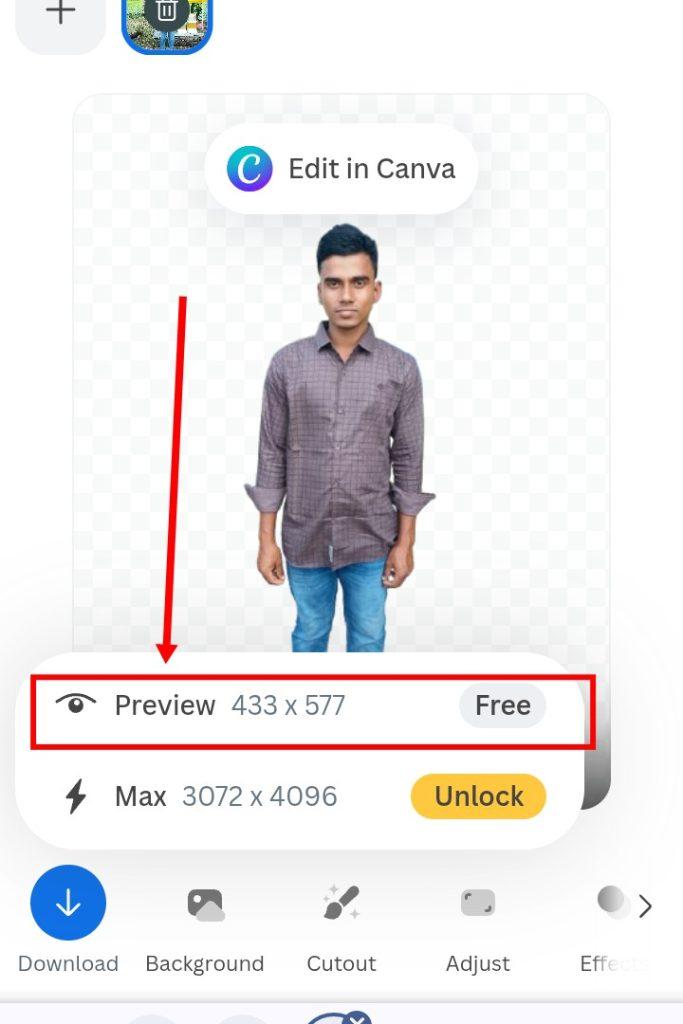
Step 4:- After clicking on the download icon, an option will show, click on the option marked as Preview. Then that image will be downloaded to your mobile.
Last words.
Removing the background of a photo is now easier than ever. Just upload the photo and you’re done.
You may not have known this before. Today’s post has brought you to know about it. And I hope that by following this rule, you too can easily make the background of any photo white.
So friends, I’m ending this here for today. If you have any questions, please comment and I’ll try to provide a solution. Stay well and healthy, thank you.